
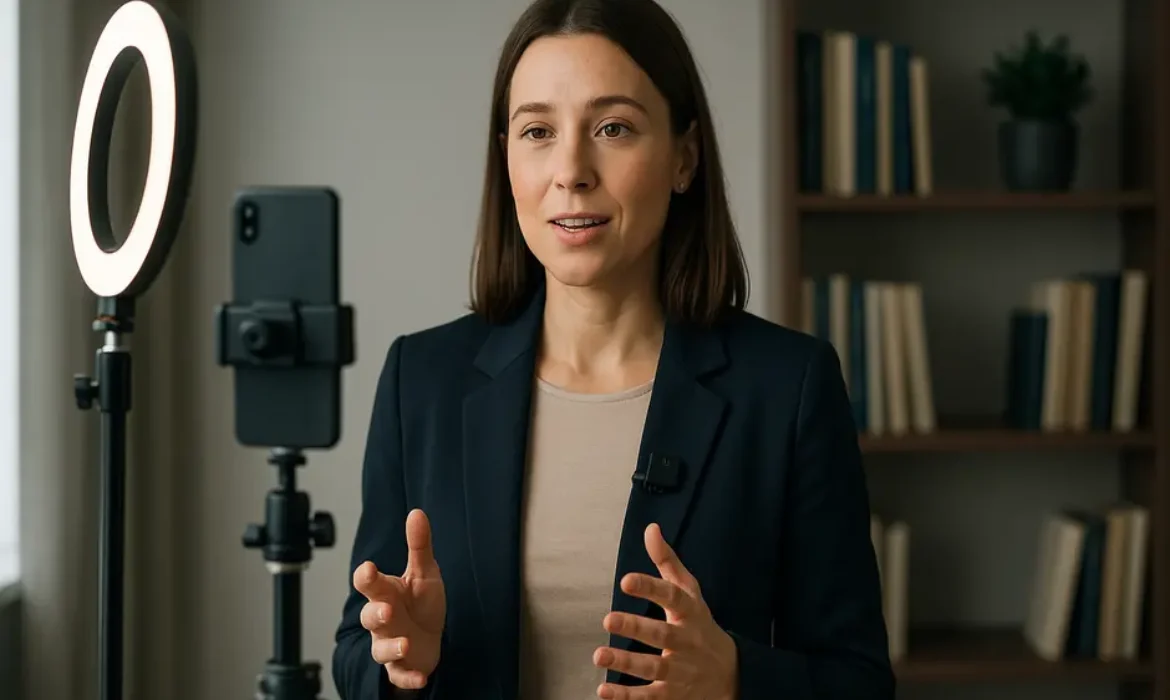
Corporate Video Production on a Budget: How to Look Professional Without a Film Crew
Estimated reading time: 14 minutes
Why Budget-Conscious Video Is No Longer a Compromise
There was a time when producing a corporate video meant booking a production company, hiring a director of photography, renting a studio, and spending somewhere between $5,000 and $50,000 before a single frame was edited. That era is not entirely gone, but for most businesses, it is no longer the only path to credible, compelling video content.
The landscape has shifted dramatically. Smartphones now shoot in 4K. Lighting setups that once required a gaffer can be replicated with a $60 ring light. Remote recording platforms like Riverside.fm have made it possible to capture broadcast-quality audio and video from opposite sides of the world. And audiences, having spent years watching YouTube tutorials, podcast recordings, and behind-the-scenes reels, no longer equate “low budget” with “low credibility.”
What they do equate with low credibility, however, is poor audio, distracting backgrounds, and shaky footage. Those are entirely avoidable problems, regardless of your corporate video production budget.
This guide is written for marketing managers, founders, in-house content teams, and anyone tasked with producing professional business video without the luxury of a full production crew. You will find specific tools, practical techniques, and a clear framework for building a video operation that consistently delivers quality output at a fraction of traditional costs.
Understanding What “Professional” Actually Means on Camera
Before purchasing any equipment or booking any recording session, it is worth pausing on what “professional” actually signals to a viewer. Most people assume it means expensive cameras and cinematic color grading. In reality, it means something far more achievable.
Professional video communicates:
- Clarity — the viewer can see and hear everything without effort
- Intentionality — the framing, background, and lighting appear considered rather than accidental
- Confidence — the speaker or presenter comes across as credible and at ease
- Consistency — the visual and audio quality holds up across multiple videos
Notice that none of those qualities require a film crew. They require preparation, good judgment, and a handful of well-chosen tools. That distinction is what separates businesses that successfully produce affordable corporate video production from those that invest in gear but still look amateur.
A study by Wyzowl found that 91% of businesses now use video as a marketing tool, and yet the businesses that see the strongest returns are often not the ones with the largest production budgets. They are the ones with the clearest message and the most consistent output.
The Essential Gear Setup That Won’t Break the Bank
Building a capable low budget corporate video setup does not require buying everything at once. Start with the elements that most visibly affect quality, then build from there.
Camera
Your smartphone is almost certainly capable enough to start. The iPhone 15 Pro and Samsung Galaxy S24 Ultra both shoot in cinematic 4K with excellent dynamic range. If you want a dedicated camera, the Sony ZV-E10 or Canon EOS M50 Mark II offer interchangeable lenses, clean HDMI output for live streaming, and strong autofocus — all under $700.
Lighting
This is the single highest-impact investment you can make on a limited corporate video budget. A good key light transforms an average setup into something that looks genuinely polished.
| Lighting Option | Best For | Approximate Cost |
|---|---|---|
| Ring Light (18-inch) | Talking head videos, solo presenter setups | $40–$80 |
| Elgato Key Light | Desk or seated setups, soft diffused look | $150–$200 |
| Godox SL60W (softbox) | More cinematic two-point lighting | $90–$130 |
| Window light + reflector | No-cost option when natural light is available | Free–$20 |
Position your key light at roughly 45 degrees from your face, slightly above eye level. Avoid placing it directly behind your camera — that produces flat, unflattering light and is the most common mistake in self-produced business video content creation.
Audio
This is non-negotiable. Bad audio will destroy an otherwise excellent video faster than any visual imperfection. A viewer will forgive soft focus before they forgive muffled or echo-heavy sound.
Recommended microphones for a corporate video without a studio setup:
- Rode Wireless GO II — clip-on wireless system, clean broadcast quality (~$300)
- Blue Yeti — USB condenser, excellent for desk setups (~$130)
- DJI Mic — compact, wireless, surprisingly good for the price (~$280)
- Rode VideoMicro — attaches to camera, solid directional capture (~$80)
If budget is extremely tight, recording in a small carpeted room with soft furnishings around you will do more for audio quality than most cheap microphone upgrades.
Background and Environment
Your background communicates brand values instantly. A cluttered background suggests disorganization. A stark white wall can feel sterile. The best approach is a thoughtful, real environment: a bookshelf with curated titles, a clean corner of your office with soft natural light, or a simple branded backdrop.
Avoid virtual backgrounds unless your green screen setup is genuinely clean. Poorly rendered virtual backgrounds are one of the fastest ways to lose viewer confidence.
Choosing the Right Video Format for Your Goals
Not all corporate video formats require the same resources. Matching your video type to your actual goals — rather than defaulting to the most elaborate option — is a core principle of sensible corporate video production budget management.
Talking Head Video
The most versatile and scalable format for businesses working without a crew. A single presenter, well lit, speaking directly to camera, can carry enormous credibility. Thought leadership content, product explanations, team introductions, and opinion pieces all work exceptionally well in this format.
The key to a great talking head video is scripting that doesn’t sound scripted. More on that in the next section.
Testimonial Video
Customer testimonials filmed on a smartphone or recorded remotely via Riverside.fm carry genuine persuasive power. According to Nielsen, 92% of consumers trust earned media — including peer recommendations and testimonials — over any form of brand-produced advertising.
For remote testimonial recording, a simple guide sent to the customer in advance (lighting tips, background suggestions, audio recommendations) will significantly improve the quality of what you receive back.
Explainer Video
Animated or screen-recorded explainer videos can be produced entirely without a camera. Tools like Loom, Descript, or even Canva’s video editor allow you to produce clean, visually coherent explainer content. For software products or service walkthroughs, a well-narrated screen recording often outperforms a traditional filmed video.
Company Culture Video
This format benefits from being less polished. A company culture video that looks slightly raw, with genuine laughs and candid team moments, lands far better than an over-produced corporate brand video where everyone appears to be reading from a script. Shoot it on a smartphone, edit loosely, and let personality come through.
Corporate Brand Video
This is typically where businesses consider spending more. A flagship brand video that communicates your mission, values, and offer in two to three minutes is worth investing in relative to the others. Even so, a $2,000 to $4,000 brand video produced with the right approach will consistently outperform a $20,000 version that lacks a clear message.
Recording Tools and Software Worth Knowing
The right software stack makes the difference between a professional workflow and a frustrating one.
Riverside.fm
One of the strongest tools available for remote video production. Riverside.fm records locally on each participant’s device rather than streaming compressed video over the internet, which means you capture broadcast-quality footage regardless of connection speed. The platform is widely used by podcast and video teams who need clean multi-track recordings without a studio environment.
SquadCast
Similar to Riverside.fm in its local recording approach, SquadCast is particularly popular with audio-first teams who also produce video. It integrates cleanly with Descript for editing workflows and is a credible option for remote interviews and panel-style corporate content.
Teleprompter App
For anyone nervous about speaking to camera or needing to stay on-message, a teleprompter app is genuinely transformative. Tools like Teleprompter Premium or Parrot Teleprompter allow you to scroll a script at a readable pace directly over the camera lens. The result is a speaker who maintains eye contact, stays on message, and appears far more confident than they might naturally feel.
The critical technique here: write your script the way you speak, not the way you write. Short sentences. Conversational rhythm. Pauses built in. Read it aloud several times before recording.
Descript
Descript is a video and audio editor that allows you to edit footage by editing a transcript. It significantly reduces post-production time for talking head content and includes features like filler word removal, studio-quality audio enhancement, and screen recording. For in-house teams with limited editing experience, it is one of the most practical tools available.
CapCut (Professional Version)
For social-first video content — short clips, branded reels, repurposed longer content — CapCut’s desktop version offers strong auto-captioning, template-based editing, and solid color correction tools. Not a replacement for full video editing software, but highly capable for fast-turnaround content.
How to Direct Yourself (or Your Team) Without a Director
One of the most common failure points in low budget corporate video is performance. Gear and software can be figured out. But getting a CFO, CEO, or subject matter expert to speak naturally and confidently on camera without a director is a different challenge entirely.
Here are the approaches that consistently work:
Pre-record a practice run. Before the actual take, record a full run-through and play it back. People are often shocked to discover their own habits — looking away at key moments, rushing through important lines, crossing their arms — and they self-correct naturally once they see it.
Use bullet points, not full scripts (most of the time). Unless the content is highly technical or compliance-sensitive, speaking to bullet points produces more natural delivery than reading a full script. Prepare your key messages, practice them conversationally, and allow slight variation between takes.
Record in short segments. Rather than attempting a continuous five-minute take, record section by section. This reduces pressure, makes editing easier, and allows each segment to be its best version independently.
Give specific direction. Instead of “be more natural,” say “imagine you’re explaining this to a colleague over lunch” or “pretend you’ve had this conversation a hundred times before.” Concrete framing produces better results than abstract instruction.
Conduct an interview instead of a monologue. For executives or subject matter experts who struggle with solo recording, have someone off-camera ask them questions and edit out the questions in post. The answers will sound far more authentic than a prepared statement.
Post-Production on a Budget: Editing Without an Agency
Editing is where a good video becomes a great one — and where many in-house teams feel most out of their depth. The good news is that modern editing tools have lowered the barrier significantly, and for most corporate video formats, you do not need complex post-production.
Video Editors Worth Considering
| Tool | Best For | Cost |
|---|---|---|
| Descript | Transcript-based editing, talking head video | Free / $24 per month |
| DaVinci Resolve | Full-featured professional editing | Free (advanced paid version) |
| Adobe Premiere Pro | Industry-standard, integrates with entire Adobe suite | ~$55/month |
| Final Cut Pro | Mac users, fast rendering, intuitive timeline | $299 one-time |
| CapCut Desktop | Social-first short content, auto-captioning | Free / subscription |
The Elements That Elevate Edited Video
Captions. A significant portion of viewers watch video without sound, particularly on LinkedIn and Facebook. Auto-captioning tools within Descript, CapCut, and Adobe Premiere have improved dramatically, but always review for accuracy before publishing.
B-roll. Cutaway footage — whether it is your product in use, your team at work, or relevant environmental shots — makes a talking head video far more watchable. Even 15-30 seconds of relevant B-roll cuts between main footage can significantly reduce perceived production cost.
Music. A carefully chosen background track at low volume (around -18 to -22 dB below dialogue) adds emotional texture and professional polish. Use only licensed music. Epidemic Sound and Artlist both offer flat-rate subscriptions for unlimited commercial use.
Color correction. You do not need a colorist. Most editing software includes basic color presets or LUTs (Look Up Tables). Matching the color temperature across cuts and ensuring faces look natural are the two priorities.
Intro and outro. A simple branded opener (logo, brand colors, consistent typography) and a clear call to action at the end of every video builds recognition and gives each video a sense of completion. Canva makes these straightforward to produce even without design experience.
Distribution Strategy: Making Sure Your Video Gets Seen
Producing excellent corporate video content without a clear distribution plan is one of the most common mistakes businesses make, regardless of budget. A $300 video that reaches the right 10,000 people delivers more value than a $15,000 video that lives on a Vimeo page no one visits.
YouTube remains the second largest search engine in the world. Optimizing your video title, description, and tags for search intent gives your content long-term discoverability. A corporate explainer video with a well-optimized YouTube page can continue generating views and leads for years.
LinkedIn is the primary channel for B2B video distribution. Native video (uploaded directly rather than shared as a YouTube link) consistently outperforms linked content in reach. Keep LinkedIn videos concise — 60 to 90 seconds tends to perform best — and include captions.
Your website. Embedding video on key landing pages, especially product pages and about pages, has a measurable impact on time on page and conversion. According to HubSpot, landing pages with video can increase conversions by up to 80%.
Email. The word “video” in an email subject line has been shown to increase open rates. Even a thumbnail image linked to a hosted video (rather than embedded video, which most email clients do not support) can significantly improve click-through rates in email campaigns.
Repurposing. Every long-form corporate video should be broken into shorter clips for social distribution. A three-minute brand film becomes three or four 30-to-60-second clips, each tailored to a specific platform or audience segment. This multiplies your return on any single production session.
Key Takeaways
-
- A professional-looking corporate video is far more about intentional preparation than expensive equipment. Audio quality, lighting, and a considered background are the three factors that most visibly separate amateur from professional output
- Matching your video format (talking head, testimonial, explainer, company culture, brand video) to your specific goals is more important than spending more on production
- Tools like Riverside.fm, SquadCast, Descript, and teleprompter apps give small teams broadcast-capable infrastructure without agency-level costs
- Performance is often the hardest element to control without a director. Using interview formats, practice runs, and conversational scripting techniques consistently produces better results than scripted monologue
- Post-production essentials — captions, B-roll, licensed music, and basic color correction — are achievable with free or low-cost tools and dramatically elevate perceived production quality
- Distribution strategy should be planned before production begins, not after. The same video, properly repurposed and distributed across YouTube, LinkedIn, your website, and email, can reach significantly more of your target audience with no additional production spend
FAQs
Q1: What is a realistic corporate video production budget for a small business?
For most small businesses, a functional and genuinely professional video setup can be built for between $500 and $1,500 in one-time equipment costs (camera or smartphone mount, lighting, microphone), with ongoing software costs of $25 to $55 per month depending on which editing tools you use. For occasional outsourced editing or a one-off brand film, budgeting $1,500 to $4,000 for a freelance videographer or editor is reasonable without compromising quality. The key is understanding that ongoing content — weekly or monthly business video content creation — should be handled in-house wherever possible to reduce per-video costs over time.
Q2: Can I really produce a professional business video without a studio?
Absolutely. Most of the corporate video content that performs well online today is shot in real environments rather than studios. A well-lit corner of an office, a home workspace with soft natural light, or a clean outdoor location with controlled audio can all produce results that are indistinguishable from a studio setup to most viewers. What matters is that the background feels intentional, the light is flattering, and the audio is clean. Those three things are achievable anywhere.
Q3: How do I make a talking head video that doesn’t look boring?
The most common reason talking head videos feel flat is that nothing changes visually for the entire duration. Introduce B-roll footage at relevant moments, vary your shot framing (a wider shot for context, a tighter shot for emphasis), use light on-screen text to reinforce key points, and keep the video shorter than you think it needs to be. The other factor is energy — a speaker who is genuinely engaged with the topic will hold attention regardless of the production setup around them.
Q4: Is Riverside.fm better than Zoom for recording corporate video remotely?
For production purposes, yes, significantly. Zoom compresses both video and audio during the call, which means the recording reflects the quality of everyone’s internet connection. Riverside.fm records locally on each participant’s device in high resolution and then uploads the uncompressed files, meaning the quality of the final recording is not affected by connection speed or bandwidth drops during the call. For any content intended for public distribution — interviews, testimonials, panel discussions — Riverside.fm or SquadCast are the professional choices.
Q5: What type of corporate video generates the best ROI for B2B companies?
Testimonial videos and explainer videos consistently deliver measurable ROI for B2B companies, largely because they address objections and build trust at key decision points in the buyer journey. A well-produced customer testimonial that speaks directly to a specific pain point and outcome is often more persuasive than any amount of ad spend. Explainer videos that clarify complex products or services also tend to perform well on landing pages, reducing bounce rates and increasing qualified lead conversion.
Q6: How long should a corporate video be?
It depends entirely on where the video will live and what it needs to accomplish. For LinkedIn and social media, 60 to 90 seconds is the current performance sweet spot. For YouTube, between two and five minutes works well for educational or explainer content, provided the pacing is tight. For a homepage brand video, 90 seconds to two and a half minutes is generally optimal. The underlying principle is the same for every format: end before the viewer loses interest, not after. It is always better to leave a viewer wanting slightly more than to push through padding to hit an arbitrary length target.
Q7: Do I need to hire a professional video editor, or can I learn to do it in-house?
For most corporate video formats, in-house editing is entirely viable — especially with tools like Descript, which makes the process intuitive even for non-editors. The time investment to reach a competent editing standard for talking head content, testimonials, and social clips is much smaller than most people assume. Where professional editing becomes genuinely worth the cost is in flagship brand video production, complex multi-camera work, or high-stakes launches where every visual detail needs to be precisely calibrated. For routine content cadences, building in-house capability almost always produces a better long-term return on investment.
Producing high-quality corporate video without a film crew is no longer an exercise in compromise. The tools are accessible, the knowledge is available, and the audience has shifted its expectations in your favor. What separates the businesses that consistently produce credible, effective video content from those that don’t is almost never budget. It is a commitment to getting the fundamentals right — sound, light, message, and distribution — and then repeating that process consistently over time.
Start with one format. Master the workflow. Build from there.